How to animate AI images is becoming one of the most exciting creative workflows for digital artists and storytellers. AI image generators make it easy to create stunning artwork, and modern AI animation tools now allow creators to turn static AI images into cinematic motion scenes. With the right prompts and workflow, a single AI image can evolve into a short animated clip using AI image animation tools and image-to-video technology. If you’re curious about the technology behind these systems, our guide on how generative AI works explains how AI models transform prompts into original images.
This tutorial focuses on AI image animation for beginners, showing a simple workflow that anyone can follow to turn static AI artwork into motion.
What Is AI Image Animation?
AI image animation is the process of turning a static image into a short animated clip using AI image-to-video tools. These tools analyze the structure of an image and simulate motion such as camera movement, lighting changes, environmental effects, or character animation. Most creators follow a simple workflow: generate an image, animate the image using an AI animation tool, and refine the clip using video editing software.
Basic AI Image Animation Workflow:
- Generate an AI image with strong lighting and composition
- Upload the image to an AI animation or image-to-video tool
- Generate motion such as camera movement or environmental effects
- Edit the animated clips together using a video editor
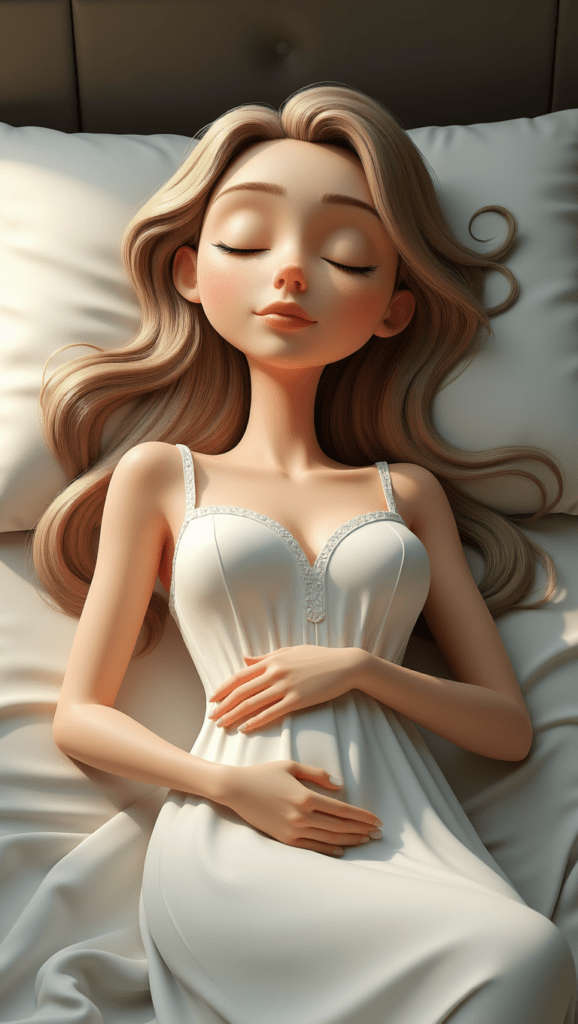
Original Image
Image with Animation, Effects, and Music
But once you create a beautiful AI image, many creators quickly start asking the same question:
How do you animate AI images?
This guide explains a beginner-friendly workflow for turning still AI images into animated scenes. A single image can now become the beginning of a story. Instead of building animation frame by frame like traditional animation, creators can use AI tools to bring motion into a scene that once existed only as a still picture. With the right prompts and editing workflow, a static image can evolve into a cinematic moment.
Most creators follow a simple process when learning how to animate static AI images:
AI Image + AI Animation + Video Editing
This step-by-step AI image animation tutorial will walk through the beginner workflow many creators use to transform still images into animated scenes. For creators learning step by step AI image animation, the process usually begins with creating a strong image that contains clear lighting, composition, and visual depth.
Step 1: Create an Image for AI Image Animation
The first step in the AI image animation process is creating a strong base image. AI animation tools analyze the structure of an image to determine how motion should behave, so images with clear lighting, strong composition, and defined subjects tend to animate much more naturally. When generating images that will later be animated, it helps to think about the scene as if it were part of a film.
A simple prompt structure that works well is:
Subject + Environment + Lighting + Atmosphere
For example, instead of prompting something basic like:
(A) A dragon flying over a castle
You might create a more cinematic prompt:
(B) A massive traditional European dragon flying past the viewer in a dramatic close side profile, its large wings attached to powerful shoulders and spread wide mid-flight. The dragon has a long reptilian neck, defined snout, sweeping horns, and layered reptilian scales across a muscular body. Two strong forelegs hang naturally beneath the chest with five clearly defined claws on each hand, arranged like a reptile or lizard hand with five separate fingers, gripping slightly as it flies. The wings are separate structures attached to the shoulders, with long wing bones supporting the membrane and not forming the claws of the forelegs. Two powerful hind legs trail behind with large talons, and a long tail flows through the air ending in a sharp spear-shaped tip. Warm golden sunset light illuminates the dragon from the front and side so the scales, claws, and wing membranes are clearly visible rather than silhouetted. Below, a sprawling medieval stone castle with tall towers and battlements rises from a rocky hill surrounded by forests and distant mountains while the dragon banks powerfully through the sky with strong wingbeats, creating a dynamic cinematic fantasy scene full of light, detail, and epic scale.
This type of prompt with more detail provides the AI with much more visual context, which often results in stronger animation later. Understanding how to animate AI images begins with creating a strong base image that contains clear lighting, composition, and visual structure. Using the formula above, you can collaborate with ChatGPT to refine and improve your prompts for stronger results. Prompt development is often an iterative process, and it may take a few adjustments to achieve the desired outcome. Certain subjects, such as dragons, often require additional specificity to render accurately, which is why detailed descriptions of anatomy and structure can be important when crafting effective prompts.
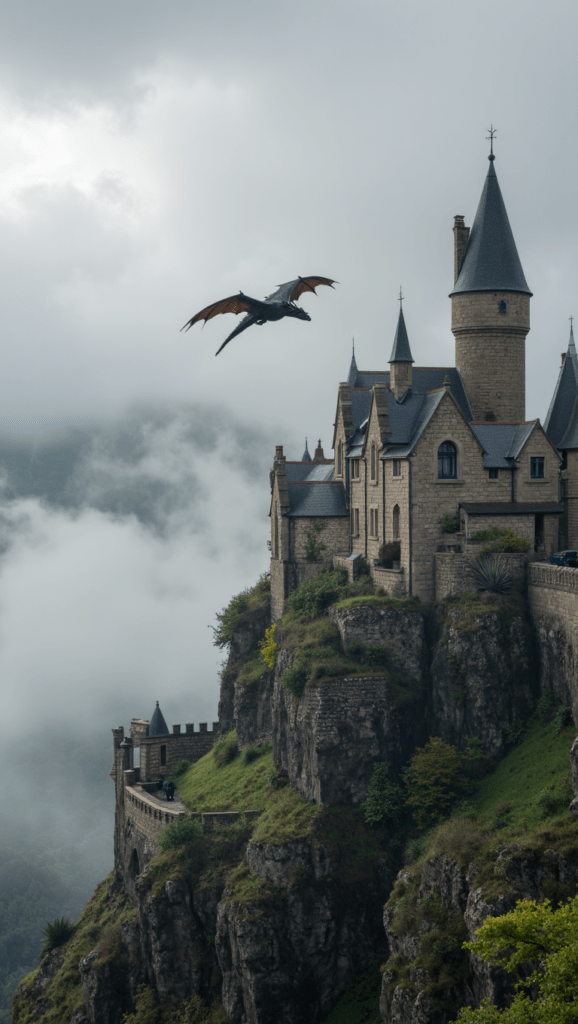
(A)
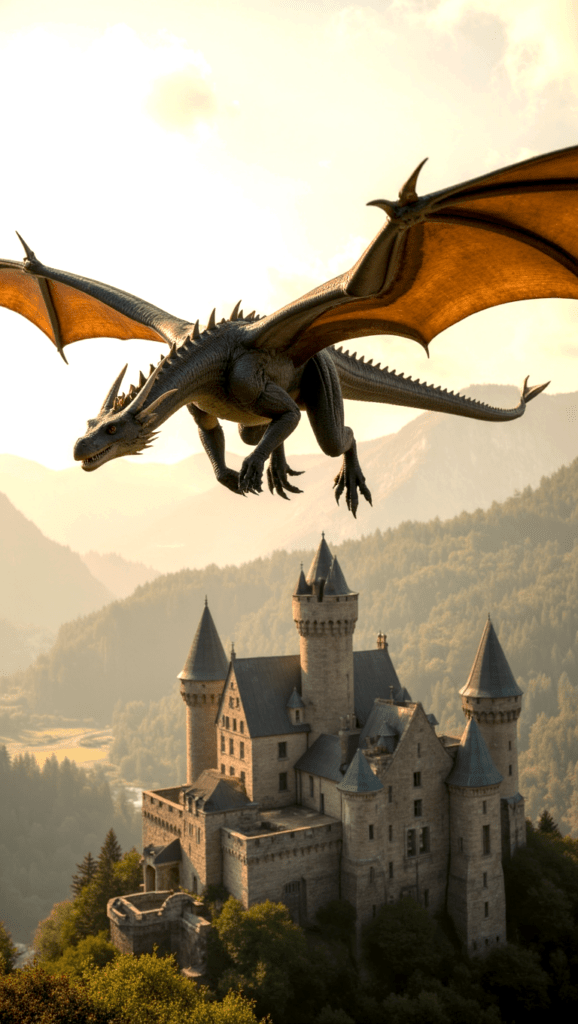
(B)
(C)
(C) Epic fantasy scene, a large dragon with glowing eyes soars powerfully through the air, wings beating rhythmically. Beneath, a medieval castle stands proudly atop a hill, its stone walls catching the warm light. Trees sway gently in the breeze around the castle. Mist drifts slowly through the distant mountains. Cinematic, wide-angle shot with a slow, upward camera pan following the dragon’s flight.
Many fantasy creators actually begin by developing their worlds, characters, and lore before generating images or animation. If you’re building deeper story worlds, our guide to the best AI writing software for creative writing and fiction explores tools that help authors design magic systems, cultures, and character arcs.
If you want to learn more about building effective prompts, you can read our guide here:
Better prompts almost always lead to better AI animation results.
Pro Tip: Inspect Your Image Carefully Before Animating
Before animating anything, take a moment to examine the image closely.
AI generated images sometimes contain small visual errors such as:
- Extra fingers (you don’t want an Ariana Grande Vogue moment)
- Unusual hand shapes
- Distorted limbs
- Strange background artifacts or AI slop
These issues may not be obvious when the image is still, but they can become very noticeable once motion is introduced. Many AI animation tools attempt to correct these issues automatically, but it’s always safer to catch them beforehand. A small visual error can sometimes ruin an otherwise beautiful animation.
Developing a careful eye for detail will save time and frustration later in the process.
Step 2: Animate the Image Using AI Image Animation Tools
Once you have a strong image, the next step is generating motion.
This process is commonly referred to as AI image animation or AI image-to-video animation. Many modern tools make it easy to animate static AI images, allowing creators to transform still artwork into moving scenes with minimal editing. When learning how to animate AI images, most creators experiment with several motion prompts before finding the animation that best fits the scene.
AI animation tools analyze the image and simulate motion such as:
- Subtle camera movement
- Environmental motion like wind or fog
- Lighting changes
- Character motion
One tool many creators experiment with for this step is VideoExpress, which offers a lifetime access option so animations can be generated without worrying about credit costs.
Affiliate Link Disclosure:
This article includes affiliate links. When you make a purchase using one of those links, I may earn a small commission. There’s no extra cost to you, and I only recommend software I actively use and trust.
Full Disclosure:
https://www.fantasyfusionai.com/affiliate-link-disclosure/
👉 FlexClip:
https://www.fantasyfusionai.com/go/flexclipai
👉 VideoExpress AI:
https://www.fantasyfusionai.com/go/videoexpress
Tools like this generate short animated clips based on the image and motion prompts provided. Sometimes the first result works perfectly, while other times the AI produces something unexpected. AI image animation can be unpredictable, and it may take several attempts to achieve the desired motion. However, that unpredictability can also lead to surprisingly cinematic results that were never planned, and those unexpected moments are often where some of the most creative and magical outcomes appear.
Pro Tip: Think About Camera Angles and Storytelling
When learning how to animate static AI images, beginners often focus only on motion. However, what truly makes animation engaging is visual storytelling. Instead of jumping straight into character animation, it can be more effective to begin with an establishing shot that sets the scene and creates context for the viewer.
Examples might include:
- An aerial view of a tropical beach
- A dewy morning in the forest
- A futuristic cyberpunk city skyline with fog
These types of shots help build atmosphere and give the animation a cinematic feel. Some creators sketch simple storyboards before animating. These sketches don’t need to be detailed. Even rough illustrations can help outline the sequence of scenes and camera movement.
The goal isn’t artistic perfection but clarity. Seeing the overall vision laid out visually acts almost like a wireframe for the story, helping guide how the animation will flow and preventing endless rabbit holes of experimenting with prompts and animation ideas.
Many modern AI tools are specifically designed to show creators how to animate static AI images, generating motion like camera movement, environmental effects, and subtle lighting changes.
How to Create an AI Animation Avatar
Creators are increasingly using AI animation tools to turn static portraits into talking avatars. Instead of animating environmental motion or camera movement, these tools focus on facial animation and lip syncing.
The core AI animation workflow looks like this:
- Create an AI image
- Animate the image using an AI animation tool
- Refine the result using video editing software
First, generate a clear portrait image. Characters with visible facial features tend to animate best because the AI needs strong visual reference points for the mouth, eyes, and facial structure. AI animation tools usually produce better results with human characters since most models are designed to track human facial structure and expressions. Animals and fantasy creatures can still work, but the animation may be less precise.
Once the image is ready, many creators upload the portrait and combine it with an audio track. This audio can either be your own recorded voice or generated voice narration using text-to-speech tools such as ElevenLabs.
Some platforms then analyze the audio waveform and generate lip movement that attempts to match the spoken words. The result is a short animated clip where the character appears to speak directly to the viewer.
For example, tools like HEDRA AI allow you to upload an image, attach an audio clip, and automatically generate a lip-synced AI avatar animation. These clips are usually around ten seconds long and can be used for social media videos, storytelling projects, or animated character introductions. They can be edited just like any other video.
Best AI Tools to Animate Images in 2026
Several AI platforms now allow creators to animate static images or portraits. While each tool works slightly differently, most follow the same process: upload an image, provide motion or voice input, and let the AI generate a short animated clip.
HEDRA AI
One of the most popular tools for creating talking AI avatars. Hedra allows users to upload an image, attach voice audio, and automatically generate lip-synced animation. It performs especially well with human characters and portrait-style images.
VIDEOEXPRESS AI
VideoExpress focuses more on cinematic motion rather than facial animation. It can add environmental effects, camera movement, and subtle scene animation. While it does offer some character animation capabilities, many creators find its lip syncing less precise than specialized avatar tools.
D-ID
D-ID is another well-known platform designed specifically for talking avatars and digital presenters. It converts still portraits into speaking characters using AI voice or uploaded audio.
Because AI animation tools evolve quickly, it’s always worth exploring several options and experimenting with different motion styles.
Step 3: Refine Your AI Image Animation Using Video Editing
When exploring how to animate AI images, video editing plays a major role in refining the final animation and improving pacing. AI animation tools generate motion, but the final storytelling often happens during the editing process. Once several animated clips are created, the next step is refining them using a video editor.
Many creators use CapCut because it provides powerful editing tools while still remaining beginner friendly.
Affiliate Link Disclosure:
This article includes affiliate links. When you make a purchase using one of those links, I may earn a small commission. There’s no extra cost to you, and I only recommend software I actively use and trust.
👉 Edit and refine your animations with CapCut
https://www.fantasyfusionai.com/go/capcut
👉 All-in-One AI images and slideshows with FlexClip
https://www.fantasyfusionai.com/go/flexclipai
Video editors allow you to enhance your animation by adding:
- Music
- Transitions
- Pacing adjustments
- Visual effects
- Layered scenes
- Adjustments to video like brightness or contrast
CapCut also offers masking tools, which can be especially useful for fantasy storytelling. Masking allows you to isolate parts of a scene and add effects such as glowing magic, drifting fog, or atmospheric lighting. These techniques can dramatically elevate the final animation. Video editing is often where creators learn how to create smooth AI animations, adjusting timing, transitions, and visual effects to make the motion feel more natural.
Pro Tip: Music and Transitions Make a Huge Difference
When learning how to create smooth AI animations, many beginners focus only on visuals.
However, sound design and pacing can make an enormous difference.
Try experimenting with:
- Atmospheric music
- Slow fade transitions
- Subtle zoom effects
- Layered environmental sounds
Even simple animations can feel cinematic when music, timing, and transitions are carefully balanced. This is especially powerful in fantasy environments where atmosphere plays a major role in storytelling.
Step 4: Turn AI Image Animations Into a Complete Video
Once several animated clips are generated, the final step is assembling them into a sequence.
Instead of viewing each clip individually, think about the larger narrative.
A simple structure might look like this:
Scene 1 – Establish the environment
Scene 2 – Introduce the character or magical element
Scene 3 – Focus on the main cinematic moment
Even short animations can feel powerful when pacing, lighting, and music work together.
AI tools generate the motion, but creators shape the story.
Common Problems When Animating AI Images
Even though AI animation tools are becoming easier to use, creators often run into a few common challenges.
Lip Sync Accuracy
Talking avatar tools sometimes struggle to perfectly match mouth movement with speech. Certain words or fast dialogue may cause the animation to drift slightly out of sync.
Credit-Based Pricing
Many AI animation platforms operate using a credit system. Each animation generation consumes credits, which means experimenting with different prompts or motion styles can become expensive over time.
Animal and Creature Animation
While human faces tend to animate well, animals and fantasy creatures can sometimes behave unpredictably. AI models are typically trained on human facial data, which means non-human subjects may produce strange movement.
Unexpected Motion
AI animation is still probabilistic. Even when using the same image and prompt, the AI may generate different results each time. Sometimes the animation will look cinematic, and other times the motion may appear exaggerated or unrealistic.
Because of this, creators often generate several versions before selecting the best animation clip.
How to Animate AI Images for Beginners
AI image animation is evolving quickly, but it has already opened new creative possibilities.
Instead of mastering complex frame-by-frame animation techniques, creators can focus on:
- Storytelling
- Cinematic composition
- Atmosphere and mood
- Scene design
The AI generates the motion while the creator directs the vision. With the right workflow, a single image can evolve into a cinematic animated moment.
Continue Learning AI Image Creation
If you want to explore more tutorials on AI image creation, prompt design, and animation workflows, these guides expand on the concepts discussed in this article.
How to Edit AI Animation Clips into a Video in CapCut (Easy Beginner Guide 2026)
Edit and combine short AI animation clips in CapCut to create smoother cinematic sequences, using simple timing, transitions, and effects that transform a few seconds of AI motion into a polished animated scene.
How to Craft Picture Prompts That Create Powerful AI Images
Discover how prompt structure influences lighting, composition, and cinematic storytelling in AI image generation.
Best AI Writing Software for Creative Writing & Fiction (2026 Guide)
Explore how AI writing tools can help spark character ideas and expand your fantasy stories.
How Generative AI Works: The Powerful Shift in AI Image Creation
Understand how modern AI models interpret prompts and generate entirely new images through advanced text-to-image systems.
How to Create Consistent AI Characters for Animation (2026 Workflow)
Discover practical techniques for building recurring AI characters that stay visually consistent across storytelling, animation, and cinematic scenes.
These guides explore the creative side of modern AI tools, from prompt engineering and worldbuilding to transforming static images into cinematic visual stories.
FAQ: How to Animate AI Images
Q: What does it mean to animate AI images?
A: To animate AI images means turning a static AI-generated picture into motion using AI animation tools. These tools analyze the image and generate movement such as camera motion, environmental effects like fog or wind, and subtle lighting changes. Learning how to animate AI images allows creators to transform still artwork into short cinematic scenes.
Q: What AI tools animate images?
A: Several AI tools allow creators to animate static images. Platforms like Hedra AI focus on facial animation and lip syncing, while tools such as VideoExpress generate cinematic motion effects like camera movement and environmental animation. Other tools like D-ID specialize in talking avatar generation from portrait images.
Q: Can you animate a photo with AI?
A: Yes. Modern image-to-video AI tools can animate a single photograph by simulating motion such as facial expressions, camera movement, lighting changes, or environmental effects. These tools analyze the structure of the image and generate motion automatically.
Q: What is AI image-to-video?
A: AI image-to-video refers to technology that converts a still image into a short animated clip. The AI analyzes visual elements in the image and generates motion such as camera movement, environmental effects, or character animation. This process allows creators to turn static AI artwork into dynamic scenes without traditional animation.
Q: Can you animate static AI images?
A: Yes. Many modern AI tools allow creators to animate static AI images automatically. Image-to-video AI systems analyze the structure of the picture and simulate movement like camera pans, environmental motion, or animated characters. This makes it possible to create short animated clips from a single still image.
Q: Is AI image animation for beginners difficult?
A: Not at all. AI image animation for beginners is much easier than traditional animation because AI tools generate the motion automatically. Instead of drawing every frame manually, beginners simply create a strong image, generate motion using an AI animation tool, and refine the clip using simple video editing software.
Q: What is the easiest workflow for AI image animation?
A: A simple step by step AI image animation workflow usually looks like this:
AI Image + AI Animation Tool + Video Editing
Creators first generate a strong image, then use an AI animation tool to add motion, and finally refine the animation in a video editor.
Q: How do you create smooth AI animations?
A: To create smooth AI animations, start with an image that has clear lighting, strong composition, and well-defined subjects. These elements help AI animation tools simulate more natural movement. After generating motion, video editing tools can improve smoothness by adjusting timing, transitions, and pacing.
Q: What types of scenes work best for AI image animation?
A: Scenes with atmosphere and depth usually animate the best. Examples include forests with drifting fog, ocean waves, cyberpunk city skylines, magical fantasy environments, and cinematic landscapes. These scenes allow AI tools to add environmental motion that feels natural and immersive.
Q: Can AI animation tools create cinematic effects?
A: Yes. Many AI animation tools simulate cinematic motion such as slow camera movement, environmental effects, and lighting changes. When combined with music and editing, even a short animation created from a single image can feel like a cinematic moment.
Q: Why do some AI animations look strange?
A: AI animation tools sometimes exaggerate motion or misinterpret details in an image. Issues like distorted limbs or strange movement can occur if the base image contains small AI generation errors. Inspecting the image before animating and generating multiple animation attempts often produces better results.
Q: Can AI animate a character from a single image?
A: Yes. Modern image-to-video AI tools can animate a single character image by generating motion such as facial movement, environmental effects, or camera motion. Some tools specialize in talking avatars and lip syncing, while others focus on cinematic animation of scenes and environments.
Q: What is the future of AI image animation?
A: AI image animation is evolving quickly. As AI models improve, creators will have more control over motion, storytelling, and cinematic effects. Learning how to animate AI images now allows artists and storytellers to experiment with new forms of visual storytelling that blend AI art, animation, and video editing.
See the project in action on:
Once you understand AI image animation for beginners, you can start experimenting with more advanced techniques like cinematic camera motion and layered scene effects. For fantasy creators, storytellers, and digital artists, learning how to animate AI images opens new possibilities for visual storytelling. Many creators combine writing, world building, and AI art to bring their ideas to life. If you’re exploring tools, tutorials, and creative workflows designed for fantasy artists and storytellers, you can explore more guides and resources on the Fantasy Fusion AI homepage.
Leave a Reply